When revenue teams ask for HubSpot and Salesforce integration help, the software usually isn’t the primary problem. The problem is that marketing is working from one definition of a qualified lead, sales is working from another, and customer success is stuck downstream with incomplete context. Everyone has dashboards. No one trusts them.
That’s why RevOps consulting for HubSpot Salesforce integration matters. In mid-sized B2B SaaS companies, this work sits at the centre of revenue execution. It determines whether lead routing is clean, whether lifecycle stages mean the same thing across teams, and whether attribution survives contact with reality once campaigns, SDR workflows, and pipeline reporting all touch the same records.
Organizations rarely start from a blank portal or a clean CRM. They start with field sprawl, duplicate automations, old sync rules, and years of well-meant admin decisions layered on top of each other. The practical job is not to “connect two platforms”. It’s to create a governed operating model that your teams can effectively run.
Why Your GTM Teams Are Misaligned
The common failure pattern is easy to recognise. Marketing celebrates MQL volume in HubSpot. Sales opens Salesforce, sees incomplete records, missing context, and poorly routed leads, then decides the lead quality is bad. Customer success inherits accounts with weak handoff notes and inconsistent lifecycle data. The argument sounds like a lead quality problem, but it’s usually a systems and governance problem.

In practice, misalignment starts when the same buyer journey is represented differently in each platform. HubSpot tracks engagement and campaign activity. Salesforce tracks account ownership, pipeline, and sales execution. If those systems disagree on source, status, ownership, or stage, your teams start making decisions from conflicting records.
Misalignment is an operating issue, not a reporting issue
Leaders often notice the problem first in reporting. Pipeline by source doesn’t reconcile. Conversion reports vary by platform. Lifecycle stage counts don’t match. But the reporting issue comes later. The operating issue appears earlier, in broken handoffs and unclear ownership.
A useful outside reference on this point is Orbit AI’s guide to sales and marketing alignment, which reinforces the practical idea that alignment depends on shared process and definitions, not only better meetings.
California made this kind of consulting especially relevant because the state’s software economy created dense, fast-moving B2B environments where disconnected GTM systems quickly become a growth constraint. The U.S. Bureau of Labor Statistics reported that California’s Information sector employed roughly 694,000 people in May 2023, which helps explain why HubSpot and Salesforce integration became a practical need for standardising fields, automating handoffs, and improving reporting discipline in the region’s SaaS-heavy market, as noted in this analysis of HubSpot Salesforce integration and data analytics.
Teams don’t lose alignment because they lack tools. They lose alignment because their tools encode different versions of the revenue process.
What aligned teams do differently
Aligned GTM teams agree on a small set of operational truths:
- Lead stages mean one thing: Marketing and sales use the same lifecycle definitions across both systems.
- Ownership is explicit: A record always has a clear owner, handoff point, and fallback rule.
- Source data is governed: Original source, latest source, and campaign influence fields are defined before reporting starts.
- Escalation paths exist: When sync conflicts or routing failures happen, someone owns the fix.
If your team is stuck in recurring friction between platforms, start with the root cause, not the symptom. MarTech Do has written a related piece on why revenue teams misalign and how to fix it in 2026, and the same principle applies here. Integration succeeds when the revenue process is made explicit enough for both systems to support it.
Start with a Foundational System Audit
Most failed integrations have one thing in common. Someone started configuring sync behaviour before they understood the current state.
An audit-first approach is how you avoid rebuilding the same mess in two platforms instead of one. Before changing mappings, enabling object syncs, or adding middleware, inspect how demand generation, handoff, pipeline management, and service workflows function in practice today. The audit should cover process, data, automation, and ownership.
Audit the process before the technology
The first pass isn’t technical. It’s operational. Interview the people who touch the funnel every day. That usually means marketing operations, SDR or BDR leadership, sales operations, account executives, and customer success or service stakeholders if downstream records matter to pipeline context.
Look for friction in places like:
- Lifecycle transitions: Where does a contact move from inquiry to MQL, then from accepted lead to active opportunity?
- Lead routing rules: Which system assigns ownership, and what happens when assignment fails?
- Opportunity creation: Who creates it, from what trigger, and which fields are required at creation?
- Service visibility: Does sales need support or onboarding context inside Salesforce before expansion motions begin?
You’re not collecting opinions for their own sake. You’re identifying where system behaviour and team expectations diverge.
Audit the platforms like an architect, not a technician
Once the process is clear, inspect both systems with a governance lens. In HubSpot, that usually means reviewing properties, lifecycle usage, active workflows, form behaviour, lead scoring logic, and sync settings. In Salesforce, it usually means examining object structure, validation rules, flows, assignment logic, page layouts, duplicate management, and reporting dependencies.
The warning signs are predictable:
- Field bloat: Too many fields with overlapping purposes or no active owner.
- Rogue automation: Workflows or flows that still fire but no longer support a current process.
- Data debt: Historical values that break routing, segmentation, or attribution.
- Sync ambiguity: Fields mapped without a clear system of record.
Practical rule: If nobody can explain why a field exists, it shouldn’t be part of your cross-platform design by default.
A strong audit also checks whether teams have already overbuilt around bad data. That often shows up as extra workflows, manual spreadsheet checks, or Slack alerts trying to compensate for unreliable sync behaviour.
For teams cleaning up platform sprawl, data hygiene has to happen before architecture decisions become permanent. MarTech Do covers that foundation in its guide on how to improve data quality.
What the audit should produce
A proper audit should end with decisions, not observations. At minimum, you want:
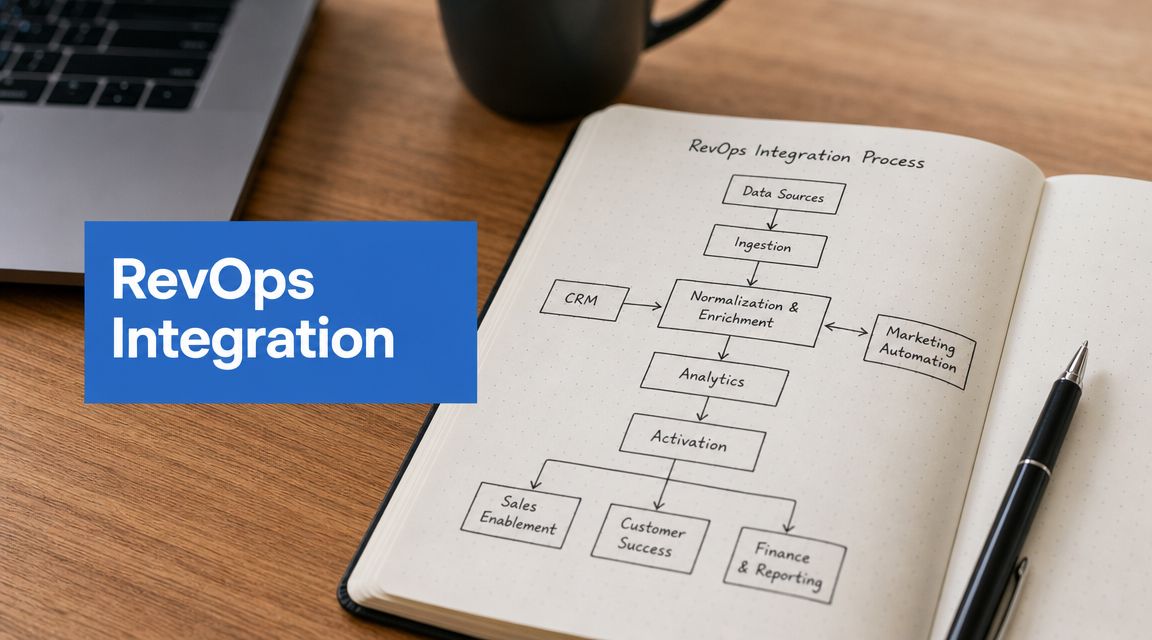
- A current-state process map that shows how records move through the funnel.
- A field inventory that separates required, useful, redundant, and risky properties.
- An automation register listing active workflows, flows, and integration dependencies.
- A risk log for duplicate creation, lifecycle drift, ownership conflicts, and attribution breaks.
That output becomes the basis for integration design. Without it, the project becomes reactive. With it, the team can decide what should sync, what should stay local to one platform, and what needs to be retired before go-live.
Design Your Cross-Platform Data Model
The integration gets stable when the data model is stable. Not before.
Too many teams treat field mapping as a clerical exercise. It isn’t. It’s architecture. The choices you make here determine whether reporting stays trustworthy when campaigns scale, territories change, or more tools get added to the stack.

A practical methodology starts with a governed data model before any sync is enabled. That means defining the system of record by object, mapping only the fields needed for pipeline and attribution, and testing in a sandbox with an integration user. It matters because broad, ungoverned sync creates compounding data quality and routing problems. For teams with complex territory or privacy scopes, field-level governance is the only scalable way to keep data consistent, as described in this expert guide to HubSpot Salesforce integration.
Define the system of record by object
Start with the objects that matter most to revenue operations. In many B2B SaaS environments, Salesforce is the operational source for accounts, opportunities, and ownership, while HubSpot often remains the engagement layer for marketing interactions and campaign execution. That won’t be universal, and that’s the point. You need to choose deliberately.
A useful design prompt is simple: where should this object be created, maintained, and trusted when a conflict occurs?
For example:
- Contacts or leads: Decide whether new net-new creation starts in HubSpot, Salesforce, or both under controlled conditions.
- Accounts or companies: Clarify whether account hierarchy, territory, and ownership live in Salesforce alone.
- Opportunities or deals: Avoid dual-pipeline logic unless there is a strong business reason and clear reporting separation.
Map only what earns its place
Not every field deserves to travel between systems. If a field does not affect routing, segmentation, compliance, attribution, or operational execution, it may not belong in the sync.
Use a mapping document that captures:
| Field area | What to document |
|---|---|
| Ownership | Which platform controls the value |
| Direction | One-way or bi-directional sync |
| Conflict logic | What happens if values differ |
| Business purpose | Why the field exists at all |
That last column matters more than teams think. If a field lacks a business purpose, it becomes reporting noise or future technical debt.
Keep the shared model narrow. You can always add a justified field later. Cleaning up a bad shared field is harder once automations and reports depend on it.
Test like production depends on it
A lot of avoidable integration issues come from skipping controlled testing. Use a sandbox. Use a dedicated integration user. Create test records that cover edge cases, not just happy paths.
Good testing includes:
- Ownership checks: Verify the right user or queue receives the record.
- Association checks: Confirm contacts, companies, and opportunities link correctly.
- Value checks: Test picklists, multi-select behaviour, dates, and blank values.
- Lifecycle checks: Ensure stage movement doesn’t trigger accidental regressions.
If your team handles multiple business units, regional privacy rules, or separate market motions, field-level governance isn’t optional. It is the design pattern that stops one team’s shortcut from corrupting another team’s reporting.
Choose Your Sync Architecture and Middleware
Once the data model is clear, the next decision is the sync engine. At this point, teams often overbuy or underbuild.
Some organisations can run well on the native HubSpot-Salesforce connector if their requirements are disciplined. Others need an iPaaS layer because the logic spans multiple systems, requires conditional branching, or depends on orchestration that the native connector shouldn’t carry.
If you want a straightforward primer before making that decision, this piece on understanding CRM integration is a useful non-vendor way to frame the problem.
Integration method comparison
| Criteria | HubSpot Native Connector | Third-Party Middleware (iPaaS) |
|---|---|---|
| Setup approach | Faster for standard object sync and straightforward mappings | Better for multi-step logic across several systems |
| Governance burden | Lower if the field model is disciplined | Higher because orchestration expands quickly |
| Custom logic | Limited to what the connector and platform automation can support cleanly | Better when routing, enrichment, or branching becomes complex |
| Maintenance | Simpler for lean teams | Stronger change control required |
| Tool sprawl risk | Lower | Higher if used to patch weak process design |
| Best fit | Teams with clear system-of-record rules and modest complexity | Teams with cross-platform orchestration needs that exceed native behaviour |
How to decide without overengineering
The native connector is usually the right first choice when your main need is object sync between HubSpot and Salesforce with clear ownership rules. It keeps the architecture simpler. Simpler systems are easier to govern, troubleshoot, and document.
Middleware becomes more appropriate when you need to coordinate Salesforce, HubSpot, enrichment tools, product signals, support systems, or finance data in a controlled sequence. In those cases, the architectural value is not “more automation”. It is controlled orchestration across systems with explicit logic.
A few practical decision tests help:
- Use the native connector when object sync is the core need and business logic can stay inside HubSpot workflows or Salesforce automation.
- Use middleware when multiple external systems must update the same record path and timing matters.
- Avoid middleware if the team is using it just to avoid cleaning up a poor data model.
Middleware should express a clean operating model. It should not become a hiding place for unresolved ownership decisions.
For teams evaluating broader integration design patterns, MarTech Do’s overview of what API integration is can help frame where native sync ends and custom orchestration begins.
One practical option in this space is MarTech Do itself, which works across Salesforce, HubSpot, and adjacent integration patterns for B2B revenue teams that need audit, design, implementation, and operational enablement without treating middleware as the default answer.
Activate Automation and Attribution Workflows
A stable sync is the foundation. The full benefit is realized when the integration starts improving day-to-day execution.
Revenue teams stop talking about records and start talking about response time, rep context, campaign influence, and pipeline visibility. If the architecture is right, automation becomes cleaner because each workflow can rely on governed data instead of compensating for missing or conflicting values.

Build handoffs that sales will actually trust
One of the highest-value workflows is the MQL-to-sales handoff. In weak integrations, this handoff is noisy. Reps get notified too early, ownership updates lag behind, or key context never arrives in Salesforce.
A stronger pattern looks like this:
- A prospect meets qualification criteria in HubSpot.
- The sync passes only the fields sales needs to act.
- Salesforce applies ownership and queue logic.
- A task, alert, or follow-up process triggers from the final owned state, not from the first marketing status change.
That sequence matters. If you notify sales before ownership and record quality are settled, adoption drops fast.
Give account teams a fuller customer view
A second workflow class connects pre-sale and post-sale context. If customer success or service activity matters to renewals, expansion, or account prioritisation, the account team needs that signal where they already work.
Common patterns include:
- Open issue visibility: Sales can see relevant service context before renewal or upsell outreach.
- Lifecycle-based nurtures: Marketing suppresses or reroutes communications based on account status and active sales process.
- Account engagement rollups: Teams use shared engagement indicators without duplicating every event across every object.
The key is restraint. Provide the context that changes behaviour. Don’t flood Salesforce with every marketing event or HubSpot with every back-office detail.
The best automation reduces decision time for humans. If a workflow creates more review work than action, it’s poorly designed.
Make attribution survivable
Attribution breaks when teams sync too much, overwrite source values, or allow multiple automations to update the same reporting fields. Clean attribution needs a controlled structure.
In practice, that means being explicit about:
- Original source ownership
- Latest touch logic
- Campaign association rules
- Opportunity influence criteria
- Which platform publishes the trusted revenue report
Some organisations report primary attribution in Salesforce because pipeline and opportunity data live there. Others keep more campaign reporting in HubSpot and reconcile downstream. Either can work if the model is governed. Neither works if source fields are mutable and undocumented.
A useful test is simple. If two admins explain your attribution logic differently, your reporting model is already fragile.
Navigate Bloated Stacks and Advanced Governance
Most real projects aren’t greenfield. They’re archaeology.
You inherit multiple lead sources, old MQL definitions, abandoned workflows, extra enrichment tools, duplicate scoring models, and integration settings built for a sales motion the company no longer runs. In that environment, the wrong instinct is to sync everything “just in case”.
Most content still treats HubSpot-Salesforce integration like a clean implementation project. That misses the harder question: when should you not sync everything, and what should stay system-specific to preserve governance? That question becomes even more important as GTM stacks fragment and teams add AI-enabled routing or enrichment layers. It is also central to deciding whether source-of-truth belongs primarily in Salesforce, HubSpot, or another operational layer such as Clay, which is often used for enrichment and workflow automation, as discussed in this HubSpot marketplace perspective on RevOps consulting.
What should stay system-specific
Not all useful data belongs in the shared layer.
Examples of data that often should remain system-specific include:
- Temporary enrichment values: Useful for prospecting or segmentation, but not always appropriate for CRM permanence.
- Operational workflow flags: Internal helper fields that support one platform’s automation only.
- Privacy-sensitive status logic: Better controlled in the platform that governs consent or communication rules.
- Experimental scoring inputs: Fine for testing, dangerous when synchronised into core sales reporting too early.
Mature RevOps teams separate business-critical shared data from local platform mechanics. Shared data supports the revenue process. Local data supports the system’s internal operation.
Simplify before you expand
Bloated stacks create a false sense of sophistication. More tools, more sync paths, and more fields can make the system look advanced while making it less reliable.
A healthier approach is data minimalism:
- Retire overlapping tools when two systems perform the same function poorly together.
- Consolidate ownership so each important field has one accountable team.
- Reduce bi-directional sync unless there is a genuine business need.
- Move enrichment off the core CRM path if it creates churn in reporting fields.
The architectural question is not “can this sync?” It’s “what breaks if it does?”
That framing changes decisions. It protects attribution. It protects forecasting. It protects adoption because reps stop seeing records filled with noisy, low-trust values.
Ensure Success with Cutover and Team Enablement
Go-live is where technical quality meets organisational reality. A sound design can still fail if users don’t understand the new process, or if cutover is rushed without clear acceptance criteria.
The most reliable cutovers are phased. Final user acceptance testing should mirror actual team behaviour, not admin assumptions. Marketing should validate forms, source capture, segmentation, and workflow triggers. Sales should validate record visibility, ownership, tasks, and opportunity context. Service or success teams should validate the downstream data they depend on, if they are part of the model.
Cut over in controlled steps
A practical cutover usually includes:
- Final validation: Confirm mapped fields, ownership, associations, and required automations behave as expected.
- Change freeze: Pause non-essential admin changes during the transition window.
- Limited release: Start with controlled production use where feasible, then expand.
- Issue handling: Route sync exceptions and user-reported problems to a named owner quickly.
The technical switch matters, but the operating switch matters more. Users need to know what changed, what they are now responsible for, and which behaviours are no longer valid.
Train to behaviour, not features
Most training fails because it focuses on screens instead of decisions. Revenue teams don’t need a platform tour. They need clarity on what to do when a lead appears, when an ownership issue occurs, when a lifecycle stage changes, or when attribution looks wrong.
A successful integration isn’t the one that goes live quietly. It’s the one that users trust enough to stop maintaining side spreadsheets.
Governance has to continue after launch. California remains a strong environment for this work because fast company formation creates a large base of B2B teams that outgrow disconnected systems quickly. The U.S. Census Bureau’s Business Formation Statistics show that California consistently ranks among the top states for new business applications, which helps explain why connecting marketing automation to CRM execution matters so much in that market, as described in this discussion of revenue operations and HubSpot Salesforce integration.
Good post-launch governance usually includes a regular review of field requests, automation changes, routing exceptions, attribution logic, and reporting trust issues. Without that cadence, even a well-built integration drifts back into inconsistency.
If your team is running HubSpot and Salesforce but still dealing with broken handoffs, messy attribution, or low-trust reporting, MarTech Do can help you audit the current state, design a governed integration model, and operationalise the workflows your GTM teams need.