A lead sits untouched in Salesforce, the account executive is away, and the routing automation keeps sending activity back to nurture because no lifecycle field has changed. In HubSpot, a support ticket ages past its service target while the owner assumes another team has it. Everyone sees a signal, but nobody owns the next action.
That's the operational gap escalation procedures should close. A useful procedure turns a stalled record, failed integration, or customer-risk event into a routing event, a named owner, an SLA clock, and an auditable outcome. The design belongs in the systems your teams already use, not in a document that gets opened only during a post-mortem.
When a Stuck Lead Exposes a Missing Escalation Path
A RevOps manager usually discovers a broken escalation path after the revenue has already become difficult to recover. An enterprise opportunity can remain in “Working” while the AE is on leave, an SDR assignment rule can return the record to nurture, and an integration warning can sit unread in a shared inbox. The CRM looks operational because the records are present. The workflow is failing because no rule converts inactivity into ownership.
The immediate cost isn't only the opportunity at risk. Sales repeats qualification work, Customer Success prepares for an account conversation without context, and RevOps reconstructs a timeline from activity history, Slack messages, and emails. The eventual post-mortem often produces the same conclusion: someone should have noticed earlier.
Practical rule: An escalation isn't complete when someone receives a notification. It's complete when the system records who accepted the issue, what they did, and whether the SLA held.
A well-designed procedure might detect stage ageing, check whether the assigned owner is unavailable, create a Service Cloud Case, and route the record to a sales support queue. In HubSpot, the equivalent workflow can create a task, update the deal, and notify a defined backup owner. The important detail is that the source opportunity or ticket changes state. A message in a channel without a record update creates another shadow process.
The same principle applies to customer and operational complaints. California's public systems demonstrate that escalation is often governed by routing rules, response windows, acknowledgement requirements, and specialist handoffs, rather than informal managerial intervention. Covered California's Ombuds Office recorded 2,715 inquiries, opened 580 cases, and resolved 396 in-house during 2023–24, with other matters routed to specialty units or handled as contacts without a case opening, as documented in its 2023–24 Ombuds Office annual report.
For B2B teams, the lesson is straightforward. The right smarter issue resolution methods still need CRM fields, ownership rules, and a clock attached to the event. Without those mechanics, escalation remains a conversation instead of a controlled workflow.
Defining Triggers and SLAs That Actually Fire
A trigger should answer two questions before anyone configures automation: what changed, and what action becomes necessary because of that change? Teams often start with thresholds because they're easy to describe, then add notifications without deciding who must act or by when. That creates alerts, not escalation procedures.
Use three trigger families, and keep each one tied to a measurable response target.
Threshold triggers identify commercial importance
A threshold trigger fires when a record crosses a business boundary. For example, an opportunity above $250,000 entering procurement might require a solutions engineer and a senior sales owner to review the mutual action plan. A lead with a score above 80 that has no accepted owner shouldn't remain in a general queue.
The threshold itself isn't the escalation. It's the condition that activates a routing rule. Set an acknowledgement target in minutes or hours, then specify what happens after the target expires. A high-value opportunity might require acknowledgement within 4 hours, while a high-intent inbound lead may need attention within 30 minutes during business hours.
Time triggers expose silent decay
Time-based triggers are usually more reliable than subjective status labels. Examples include:
- Stage age: An opportunity remains in a late-stage pipeline step for 3 business days without a logged next step.
- Inactivity: A qualified lead has no completed activity for 2 business days.
- SLA breach: A Service Cloud Case remains unassigned after 1 hour.
- Integration delay: A form submission has not created or updated the expected CRM record within 15 minutes.
The system should calculate elapsed time from a stored timestamp, not from a person's memory. If an owner marks a task complete without advancing the record, the stage-age rule should still reveal the contradiction.
Severity triggers protect risk and continuity
Severity-based triggers handle conditions where revenue value alone understates exposure. A compliance flag, an integration failure affecting account ownership, or an executive sponsor reporting a blocked renewal should move through a different path from a single missed SDR follow-up.
A tighter SLA isn't automatically better. It's better only when the receiving team can act on the alert.
Use an escalation sequence that compounds cleanly:
- Primary trigger: Route to the operational owner and require acknowledgement.
- Secondary trigger: Notify the backup owner or RevOps queue if the acknowledgement target expires.
- Executive trigger: Involve leadership only after the second tier fails or the defined business-impact threshold is crossed.
This structure avoids notifying Sales, Marketing, Customer Success, and executives simultaneously. It also gives each tier a meaningful job rather than turning escalation into a broadcast list.
| Trigger Type | Condition Example | SLA Target | Severity Tier |
|---|---|---|---|
| Threshold | Enterprise opportunity crosses the approved commercial threshold | 4 hours to acknowledge | P2 |
| Time | Qualified lead has no completed activity for 2 business days | 30 minutes to accept routing | P2 |
| Time | Service Cloud Case remains unassigned after 1 hour | 1 hour to assign | P2 |
| Severity | Compliance flag or executive sponsor reports a blocker | 15 minutes to acknowledge | P1 |
| Integration | CRM record fails to update after a form or enrichment event | 2 hours to diagnose | P2 |
California procedures show why explicit windows matter. County escalation guidance distinguishes 1 to 2 business days for urgent items and 1 to 5 business days for non-urgent items, while Cal/OSHA gives imminent-hazard complaints immediate priority through its complaint-handling guidance. RevOps teams can apply the same logic without copying the regulatory context: urgency should change the route and SLA, not merely the colour of a notification.
Roles and the Escalation Matrix
An escalation matrix is a routing artifact, not an org chart. It should tell the system and the responder who receives the event, what that person can do, and when the next tier becomes responsible.
The most durable model uses three ownership levels.
First responder
The first responder acknowledges and triages. This might be an SDR manager for a stalled MQL, a sales support queue for a routing failure, or a CSM for a customer-impacting case. They receive the record link, trigger reason, timestamp, severity, and the required acknowledgement target.
Their authority should cover validation and immediate routing. They don't need permission to redesign the workflow or negotiate a commercial exception. They hand off a verified issue with context, not an unexplained alert.
Escalation owner
The owner drives resolution. They need the permissions and domain knowledge to change assignment, correct a field, coordinate with another function, or create a Service Cloud Case or HubSpot ticket. The owner may be the AE, but “assigned AE” and “escalation owner” aren't interchangeable.
A stalled MQL might go to Marketing Operations because the lifecycle or scoring rule is wrong. A late-stage opportunity with procurement involved may require Sales Operations, a solutions engineer, and the AE. The matrix should map those secondary owners explicitly. Otherwise, everyone assumes the AE will coordinate the work, even when the AE can't repair the underlying automation.
Executive sponsor
The executive sponsor intervenes only when tier two misses its SLA or the business-impact rule is crossed. They receive a concise summary, current owner, elapsed time, customer or revenue risk, and the decision required. They shouldn't become the default destination for every difficult record.
Teams reviewing their operating model can use this revenue operations team structure as a reference point, then adapt the ownership model to their own systems and permissions.
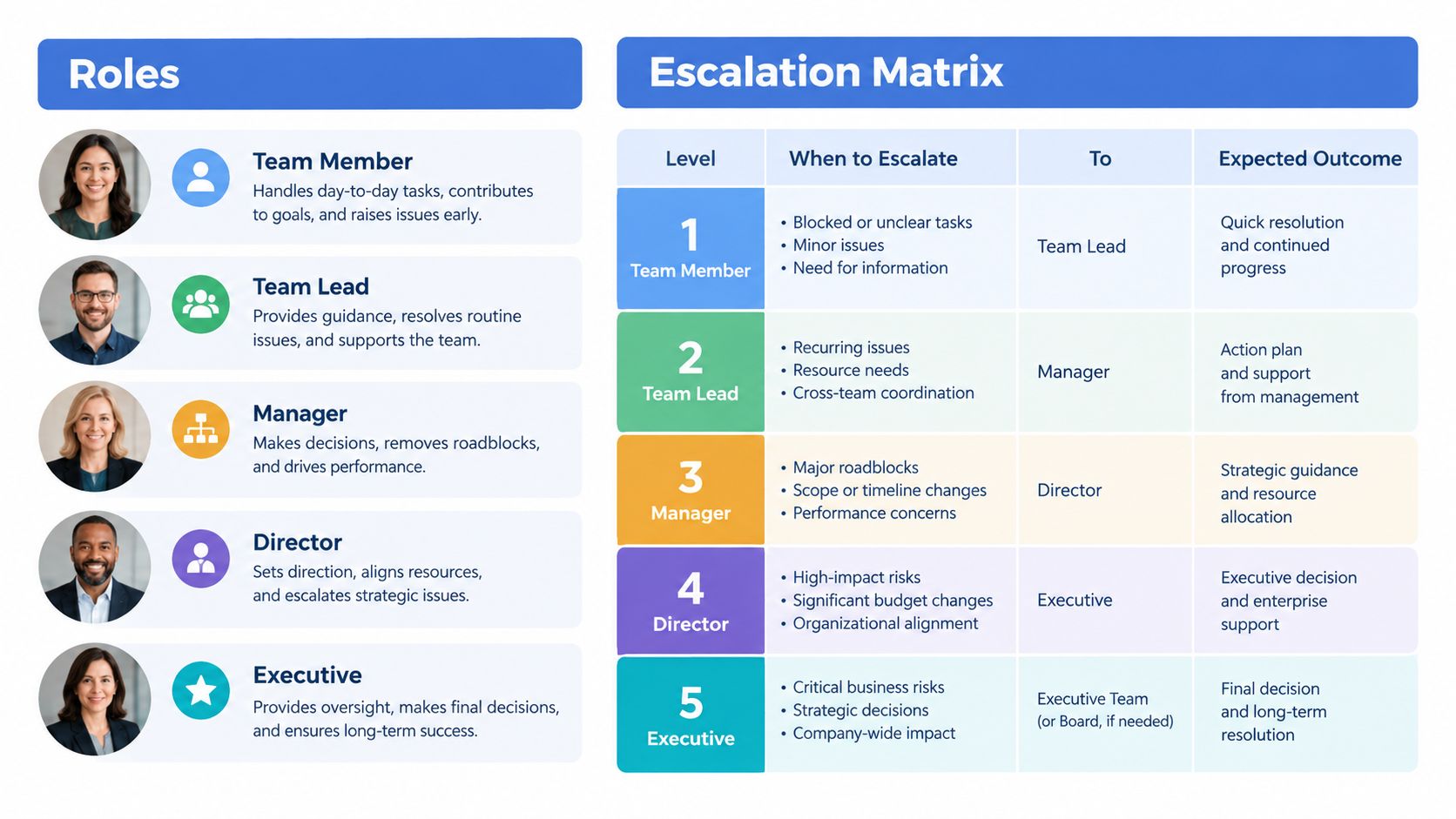
| Tier | Receives | Can do | Hands off |
|---|---|---|---|
| First responder | Trigger, record, severity, acknowledgement clock | Validate, acknowledge, route | Verified issue and context |
| Escalation owner | Full history, impact, required outcome | Resolve, reassign, coordinate, update system | Decision or unresolved blocker |
| Executive sponsor | Impact, SLA status, options, decision needed | Remove authority or resource blockers | Final decision and follow-up |
The matrix should include named queues as well as users. A queue protects coverage when one person is absent, while a user assignment creates accountability for active resolution. Use both deliberately. The system can route first to a queue, assign a responsible user after triage, and escalate to a sponsor only when the defined conditions are met.
Building Escalation Logic in Salesforce and HubSpot
The platforms should hold the procedure's state. Email and Slack can deliver attention, but Salesforce and HubSpot should store the trigger, owner, timestamps, resolution, and exception reason.
Salesforce implementation
In Salesforce, start with a Record-Triggered Flow on the object that contains the operational signal, such as Opportunity, Lead, Case, or a custom Escalation Event object. A time-based decision can use a formula pattern such as:
NOT(IsEscalated) && (Priority = 'High' && HoursSinceCreated > 4)
The formula is only useful if the fields exist and update consistently. The Flow should then:
- Check whether the record already has an active escalation.
- Set an Is Escalated checkbox.
- Assign an Escalation Owner through a queue, round-robin logic, or Apex invocable action.
- Create or update a Service Cloud Case when the issue needs structured service handling.
- Post the context to Chatter and Slack through a controlled custom action.
- Write the trigger timestamp and severity to the source record or Escalation Event.
Avoid using email as the system of record. Email can notify an owner, but it can't reliably show whether the owner accepted the work, changed the route, or resolved the underlying data issue.
HubSpot implementation
In HubSpot, use a Workflow with enrollment triggers based on ticket age, deal-stage staleness, owner availability, or a failed lifecycle transition. Add branches by Hub ID, pipeline, region, or business unit so rules don't collide across teams.
A regional sales pipeline may use a different coverage model from a global support pipeline. Branching before assignment prevents a North American queue from receiving a European escalation because both pipelines use a field named “Priority.”
HubSpot workflows should update the deal or ticket, create a task for the owner, and record the escalation reason in a dedicated property. If the issue needs engineering or structured service work, push it to Jira or Service Cloud with the source record ID, rather than creating an email thread that cannot be reconciled later.
MCAE implementation
MCAE, formerly Pardot, needs careful treatment because engagement automation and CRM ownership can drift apart. Use Engagement Studio steps with a Wait timer and a rule based on the open-minute threshold or the prospect's response. Then write the outcome back to Salesforce so Account Engagement doesn't become a shadow decision system.
For lead assignment, document the relationship between scoring, grading, lifecycle stage, and owner. The practical mechanics in Salesforce lead assignment rules should align with the escalation route, not compete with it.
| Building Block | Salesforce Flow | HubSpot Workflows | MCAE (Account Engagement) |
|---|---|---|---|
| Trigger | Record change, formula, scheduled path | Ticket age, deal stage, property change | Engagement step, rule, Wait timer |
| Routing | Queue, user, round-robin, Apex invocable | Owner, team, pipeline branch | Salesforce assignment and sync |
| Record of truth | Source record or Escalation Event | Deal or ticket property and activity | Salesforce source record |
| Notification | Chatter, Slack, email, controlled action | In-app task, email, Slack integration | CRM task or synced activity |
| Handoff | Service Cloud Case, Jira, specialist queue | Service ticket, Jira, Salesforce | Salesforce owner or task |
Cap notification fan-out at two channels for a single tier. For example, send the primary alert in Slack and create a CRM task. Add a phone or executive channel only when the next severity tier requires it. More destinations feel safer, but they make ownership ambiguous and increase duplicate responses.
Triage Before Escalation and Why Faster Is Not Always Better
Escalating every anomaly trains people to ignore the procedure. Triage protects the signal by distinguishing a revenue blocker from a degraded workflow and a record that needs coaching rather than intervention.
Use three severity tiers, then make the system test the evidence before routing.
- P1, revenue-blocking: A deal worth more than $50,000 remains stalled in legal review for more than 24 hours.
- P2, degraded: MQL volume drops 30% week over week from a paid channel.
- P3, informational: One SDR misses three follow-ups on a single record.
The source for the first two signals matters. A P1 should reference the opportunity and legal-stage timestamp. A P2 should connect campaign or channel data to the affected period. A P3 may create a coaching task instead of paging a manager.
The logic should require corroboration where false positives are common. In Salesforce Flow, use a Check Conditions branch that requires at least two signals before routing. For a stale opportunity, those signals might be no completed activity and no future meeting. For a marketing drop, they might be the channel-volume change plus a tracking or attribution anomaly.
Triage is not a delay. It's the control that keeps an escalation actionable.
A P1 can require human approval within the first 15 minutes before the executive tier activates. That approval confirms the blocker, validates the commercial context, and prevents a malformed field from paging leadership. The owner still receives the initial alert, but the second decision has a human checkpoint.
California enforcement practice supports this risk-tiered approach. Cal/OSHA classifies complaints to determine inspection priority, and imminent-hazard complaints receive immediate priority, as described in its complaint-handling process. California's Civil Rights Department also separates complaint pathways and intake windows rather than treating every matter as a managerial override. The operational lesson for RevOps is to route by risk, evidence, and resolution path.
Teams that need a stronger qualification gate can use this lead qualification framework to connect scoring and escalation without turning every high-score record into a priority incident.
KPIs and Reporting That Prove Escalation Is Working
A procedure earns trust when its reporting shows whether it catches issues early, reaches the right owner, and resolves the underlying cause. A high escalation count alone doesn't indicate success. It may mean the trigger is useful, or it may mean the workflow is generating noise.
Track four core measures.
Time to Acknowledge runs from the trigger timestamp to the first recorded Slack or Chatter response, or the equivalent CRM acknowledgement event. It tells you whether routing reaches a person who can accept the issue.
Time to Resolve runs from trigger to closure. Segment it by severity and trigger type because a routing failure and a procurement blocker have different resolution paths.
Recurrence Rate identifies records escalated twice within 30 days. That calculation reveals whether the first fix held or whether the team repeatedly treats symptoms.
SLA Breach Rate compares resolved events with events that exceeded the target, grouped by tier. This is more useful than a single blended rate because a P1 breach and a P3 breach carry different implications.
California's structured complaint systems illustrate why acknowledgement and resolution should be separate measures. Covered California's benchmark directs users through service-centre steps before Ombuds review, while one California complaint report records average health-care complaint resolution of 33 days in 2021 and 34 days in 2020, as shown in the California complaint data report. A fast acknowledgement doesn't guarantee a fast resolution.
Build one reporting model. In Salesforce, use a custom Escalation Event object with formula fields for the four calculations, related to the source Lead, Opportunity, Case, or Account. In HubSpot, use a custom object or consistently populated ticket properties, then group the dashboard by trigger type, owner, severity, and breach status.
| KPI | Calculation | Source / Object | Primary Audience |
|---|---|---|---|
| Time to Acknowledge | First acknowledgement timestamp minus trigger timestamp | Escalation Event, Slack or Chatter activity | RevOps and team managers |
| Time to Resolve | Closure timestamp minus trigger timestamp | Escalation Event, Case or ticket | Operations leadership |
| Recurrence Rate | Records escalated twice within 30 days divided by escalated records | Escalation Event history | RevOps and process owners |
| SLA Breach Rate | Breached events compared with resolved events by tier | Escalation Event and SLA fields | Executives and owners |
Post exceptions and newly breached items in a weekly Slack update. Reserve the monthly QBR for patterns, recurring owners, trigger quality, and the human effort consumed per quarter compared with revenue protected. Leadership needs to know whether escalation is reducing operational risk, not how many notifications the automation sent.
Templates, Runbooks, and Ongoing Maintenance
Turn the procedure into three connected assets: a matrix, a runbook, and an audit checklist. The matrix routes the event. The runbook tells the responder what to do. The dashboard proves whether the route works.
A practical matrix should include:
- Workflow: Name the process, such as inbound lead routing, late-stage opportunity, renewal risk, or integration failure.
- Trigger condition: Store the exact field, value, timestamp, and corroborating signal.
- Severity tier: Define the route and approval requirement.
- First responder: Name the queue or role responsible for acknowledgement.
- Escalation owner by tier: Map the person or team with authority to resolve.
- SLA target: Record acknowledgement and resolution targets separately.
- Source record: Include the Salesforce Case number, Opportunity ID, or HubSpot ticket ID.
- Resolution steps: State the permitted actions and required system updates.
- Post-mortem prompt: Ask what signal was missed, what rule failed, and whether the trigger should change.
Tag runbooks by workflow, not by team. Ownership changes as teams reorganise, but the lead-routing or customer-recovery workflow remains visible. This approach also prevents separate Marketing and Sales documents from describing conflicting rules for the same lifecycle transition.
California examples reinforce the need for hard procedural boundaries. The Civil Rights Department sets complaint intake windows at three years for employment cases and one year for most other cases, according to its complaint process guidance. California Department of Education compliance complaints use a 60-calendar-day resolution window, instruct follow-up by phone if there's no response within 10 days, and limit the alleged violation to the preceding one year, as described in this compliance complaint procedure. The point isn't to copy those legal workflows. It's to recognise that a trustworthy procedure names deadlines, evidence, routing, and follow-up actions.
A quarterly audit can fit into 60 minutes if the system is instrumented:
- Review triggers: Remove rules that create non-actionable volume and add missing signals.
- Test routing: Confirm queues, users, permissions, integrations, and backup owners.
- Compare SLAs: Inspect breaches by tier and check whether targets still match capacity.
- Sample records: Trace Salesforce Cases and HubSpot ticket IDs from trigger to resolution.
- Validate reporting: Confirm timestamps, recurrence logic, and ownership fields populate.
- Update runbooks: Record changes, test the workflow, and notify affected teams.
Escalation procedures decay quickly as funnels, territories, lifecycle stages, and integrations change. A recurring audit keeps the playbook honest because it tests the route against actual records, not against an org chart that stopped matching reality.
MarTech Do audits and implements Salesforce, Service Cloud, Revenue Cloud, MCAE, HubSpot, and connected GTM systems, including routing rules, automation, integrations, data governance, and escalation reporting. If your team has stalled leads, unclear ownership, or SLA breaches hidden across CRM and support tools, visit MarTech Do to discuss a practical RevOps audit or implementation plan.